When AI should ask a person before it acts
AI adoption does not become safe because the model is smart. It becomes safe when teams decide which actions can run automatically, which actions need human approval, and which actions should stay forbidden.
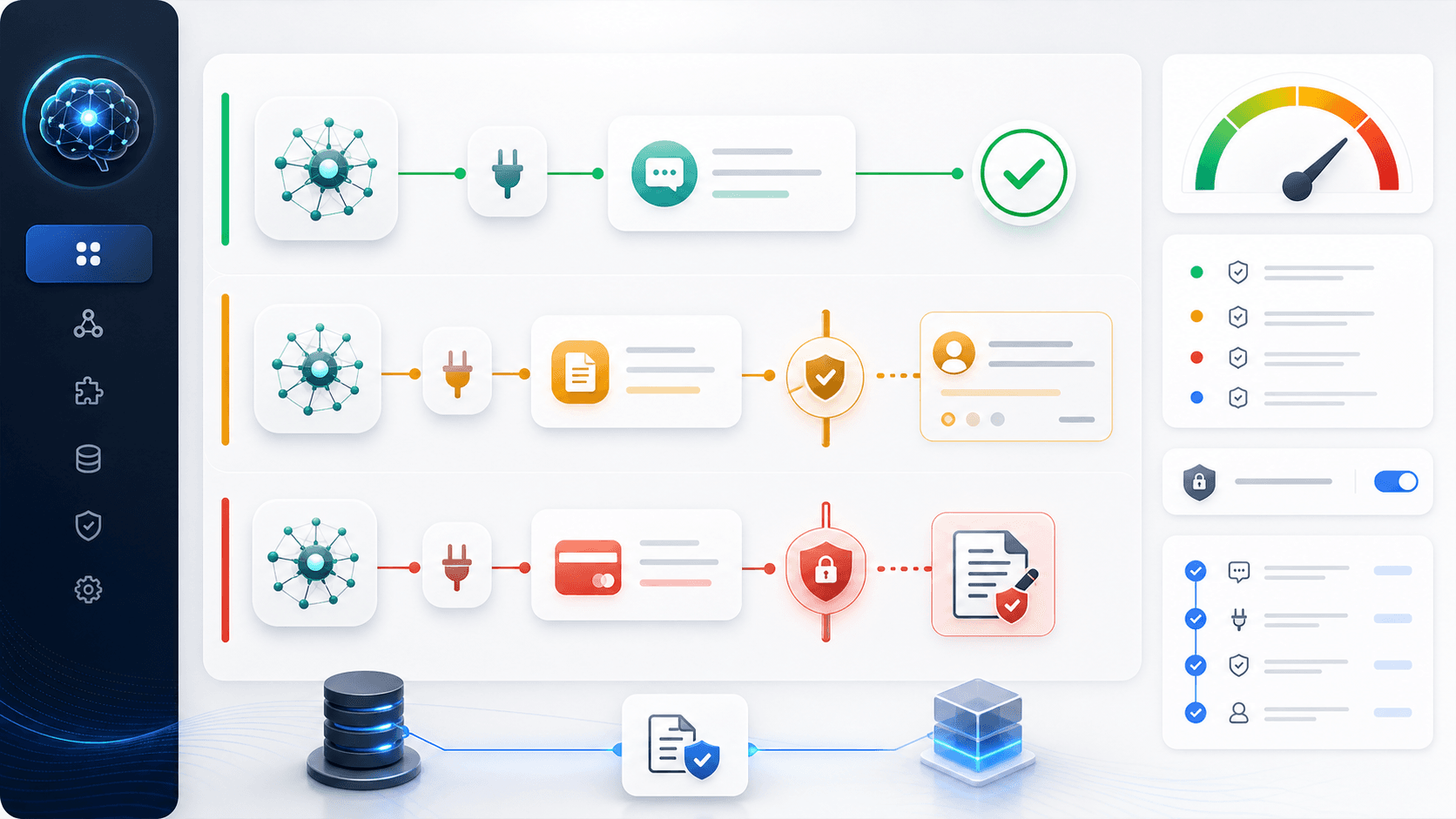
Human-in-the-loop operations
The risky version of AI adoption says, "let the agent do everything." The useful version says, "let the agent do more work, but make the stopping points explicit." A human-in-the-loop system is not a sign that the AI is weak. It is how a team turns AI from a clever chat window into a reliable operating system. The question is not whether AI should be autonomous. The question is where autonomy is earned, where approval is required, and where the system must refuse to act.
1. Overview: good automation knows when to stop
Most AI demos show the exciting part: the agent searches, drafts, edits, calls tools, and produces output. Real operations fail in the less exciting part: the agent sends the wrong message, updates the wrong field, exposes the wrong data, deletes the wrong record, or confidently acts on a weak assumption. The fix is not to avoid agents. The fix is to give them a permission boundary.
A permission boundary is the operating line between "AI may do this now" and "AI must ask first." In plain language, it is the same idea as a junior employee who can prepare the refund note but cannot send a refund without approval, or a sales assistant who can draft an offer but cannot promise a discount alone.
The official direction of the ecosystem points the same way. OpenAI describes guardrails and approvals as a way to continue, stop, or route work to human review. MCP tool guidance treats tool calls as visible actions that should be confirmed and logged. Codex uses approval modes and sandboxing because file writes, shell commands, and network access are not just text generation. They change the world.
2. Small dictionary: the words are simpler than they sound
Human-in-the-loop means the AI does part of the work, but a person remains inside the decision loop for important moments. It does not mean every output is manually rewritten. It means the system knows which moments deserve human judgment.
An approval gate is a checkpoint before action. The agent can prepare the action, explain why it wants to do it, and show the evidence. A person then approves, edits, or rejects it. Escalation means the agent hands the case to a person because the risk, ambiguity, or missing information is too high.
A confidence threshold is the point where uncertainty becomes too large for automatic action. A side effect is any action that changes something outside the model: sending an email, editing a CRM, moving money, changing a database, publishing content, running a command, or calling an API. An audit log is the evidence trail: who or what acted, when, why, with what input, and what happened.
- Human-in-the-loop: AI works, but a person stays in the loop for important decisions.
- Approval gate: a checkpoint before a real-world action happens.
- Escalation: the agent stops and asks a human because the case is risky or unclear.
- Side effect: an action that changes a customer, file, system, payment, message, or record.
- Audit log: the record that lets the team reconstruct the action later.
3. Lane one: work the AI can usually run automatically
The safest automation lane is internal, reversible, low-cost, and easy to verify. Examples include summarizing a meeting, classifying support tickets, extracting fields from invoices, formatting a draft, finding relevant SOP pages, grouping customer feedback, translating internal notes, or preparing a checklist for review.
Even here, automatic does not mean uncontrolled. The agent should still show sources when the answer depends on company knowledge. It should still keep logs. It should still avoid using stale documents when the task depends on current policy. But the user should not need to approve every formatting change or every low-risk classification. If every tiny action needs approval, the system becomes slower than manual work.
A useful rule is this: if the action is read-only, internal, easy to reverse, and cheap to correct, automation can be the default. The team can sample outputs later, improve prompts, add examples, and turn repeated failures into eval cases.
- Read-only lookup across approved documents.
- Internal summaries, classifications, formatting, and translation drafts.
- Low-risk data extraction with validation and review sampling.
- Drafting internal task tickets, SOP updates, or handoff notes.
- Clustering feedback before a person decides what to change.
4. Lane two: AI drafts, human approves
The second lane is where most business value lives. AI can do 70 percent of the work, but a person should approve the final side effect. Customer replies, refunds, outbound emails, contract clauses, lead qualification changes, public posts, support promises, and sensitive CRM updates all belong here.
The point is not distrust. The point is leverage. The AI gathers evidence, drafts the action, marks uncertainty, and explains what will change. The human spends attention only on the decision. This is usually much faster than writing from scratch, but still safer than giving the agent direct authority to act.
OpenAI approval patterns and Codex permission modes are useful mental models here. The agent can pause before the tool call, show the proposed action, and resume only after approval. In a business workflow, that approval screen should answer five questions: what will be changed, who is affected, what evidence supports it, what could go wrong, and how to undo it.
- Send a customer-facing email or chat reply.
- Issue a refund, coupon, discount, upgrade, or cancellation.
- Publish a blog post, landing page, sales page, or social post.
- Update CRM fields that affect pipeline, pricing, or customer status.
- Create a contract draft, legal-facing answer, policy exception, or payment request.
5. Lane three: forbidden by default, explicit approval every time
Some actions should not become automatic just because the model can call a tool. Money movement, account deletion, credential changes, personal data sharing, irreversible production writes, legal commitments, medical or financial determinations, mass outbound, and destructive file operations need a stronger boundary.
This is where "human-in-the-loop" becomes a management rule, not a UX preference. The system should require explicit approval every time, and sometimes two-person approval. The agent should never hide the action behind a vague "continue" button. It should show the exact action, affected system, estimated blast radius, and rollback plan.
The NIST AI Risk Management Framework is helpful because it reminds teams that AI risk is not only model accuracy. The relevant question is who can be harmed, how large the impact can be, how reversible the action is, and what evidence the organization can show after the fact.
- Move money, change billing, approve refunds above a threshold, or alter payment details.
- Delete accounts, remove data, rotate credentials, or change access control.
- Share personal, confidential, regulated, or customer-sensitive data.
- Deploy to production, run destructive commands, or overwrite important records.
- Make legal, medical, financial, compliance, or HR decisions without accountable review.
6. Why this must be designed before MCP and tool calling
MCP is best understood as a standard connector. It helps AI applications reach files, APIs, databases, and business tools through a common interface. Tool calling is the moment the model asks to use one of those capabilities. Skills or playbooks are the saved instructions for doing a recurring job. They are different layers, and confusing them leads to messy systems.
This distinction showed up strongly in the local X inbox. Builders are no longer only talking about clever prompts. They are talking about execution approvals before tools fire, MCP server management, structured logs of every tool call, permissions, hooks, lifecycle checks, and safeguards. That is the practical direction: connect tools, but make the action boundary visible.
The mistake is to connect every tool first and write approval rules later. Once an agent can send email, update CRM, fetch private records, run commands, and call payment APIs, the failure surface is already large. A better order is simpler: map actions, label risk, decide approval rules, connect only the first useful tools, then expand after logs show the system is behaving well.
7. A practical approval table for a small company
A small company does not need a giant governance department to start. It needs a simple table. For each workflow, write the action, allowed data sources, automatic lane, approval lane, forbidden lane, owner, log location, and rollback method. This can live in Notion, Obsidian, a repo Markdown file, or an internal SOP folder.
For a stay host, AI can automatically answer internal FAQ lookup and group guest questions, but should ask before sending promises about refunds, late checkout, damages, or compensation. For ecommerce, AI can classify tickets and draft replies, but should ask before refunding, changing shipping addresses, or escalating a policy exception. For outbound, AI can research leads and draft messages, but should ask before sending at scale.
For internal SOP lookup, the agent can answer with citations from approved sources, but should escalate when documents conflict or freshness is uncertain. For code or operations, the agent can propose diffs and run safe checks, but should ask before destructive commands, production deploys, credential work, or network actions that touch live systems.
- Question: is the action external-facing, expensive, sensitive, hard to reverse, or legally meaningful?
- If no: allow automation with logging and sampling.
- If yes: draft first, explain evidence, and ask for approval.
- If the blast radius is high: require explicit approval every time and keep a rollback note.
- If the action should never happen: encode it as a forbidden rule, not as a suggestion.
8. Turn approvals into a learning loop
Approval is not just a brake. It is training data for operations. Every approved, edited, rejected, or escalated action teaches the company what the agent should learn next. The team should review repeated approvals and ask whether the rule can become clearer, the source can be improved, or the task can move to a safer automatic lane.
This is where audit logs matter. A log is not bureaucracy. It is the difference between "the AI did something weird" and "on this date, the agent used this source, proposed this action, the human edited this field, and the result was accepted." Without that trail, incidents become vibes. With the trail, they become improvement work.
The loop is straightforward: collect approval cases, label why approval was needed, update SOPs, add examples, create eval cases, tighten forbidden actions, and only then expand autonomy. Autonomy should be earned by evidence, not granted by optimism.
9. As AI grows, people must grow with it
Better AI does not remove the need for better humans. It changes where human skill matters. The valuable operator is no longer only the person who writes every reply by hand. It is the person who defines the work, chooses the source of truth, sets the approval boundary, notices failure patterns, and turns repeated corrections into a better operating system.
This is why human-in-the-loop design is not anti-automation. It is the path to deeper automation. When people learn to specify risk, evidence, ownership, and rollback, the agent can safely take on more work over time. The human moves from doing every small task to designing the conditions under which the system can be trusted.
The practical first step is small. Pick one AI workflow this week and write three lanes for it: automatic, approval required, forbidden. Add one owner, one log location, and one rollback rule. That single table will improve the next agent more than another vague prompt.
참고자료
- OpenAI Agents SDK docs: Guardrails and approvals
- OpenAI Codex docs: Agent approvals and security
- OpenAI Codex docs: Permissions
- Model Context Protocol: What is MCP?
- Model Context Protocol specification: Tools
- NIST AI Risk Management Framework
- Anthropic: Building effective agents
- Anthropic: Effective context engineering for AI agents
- X: Hermes ecosystem signal on execution approvals, MCP management, and tool-call logs
- X: OpenHarness signal on tools, permissions, hooks, and observability
- X: Tool Calling, MCP, and Skills are different layers signal
- X: company OS, MCP, skills, operating principles, and safeguards signal
Design the approval boundary before you connect the next AI tool
Guildex Fit Check helps teams map repeated work, source-of-truth documents, tool permissions, approval gates, logs, and rollback rules so the first AI workflow becomes useful without becoming reckless.